
Ruhavik — Analyze your trips
GURTAM RnDAuto & Vehicles
4.518.00 Reviews
- Version
- Varies With Device
- Installs
- 500.00K
- Age Rating
- Everyone
Screenshots
Our Review of Ruhavik — Analyze your trips
 Analysis by Appyee
I look at a trip-tracking app differently from a map or a mileage log: it needs a reason to collect a detailed record of where a vehicle goes. Ruhavik — Analyze your trips is aimed at drivers who want to examine their journeys and driving patterns, rather than simply find a route. That makes it potentially useful, but it also means I’d think carefully about when I want tracking active and who can see the resulting information.
Trust starts with a clear purpose
Ruhavik is an Auto & Vehicles app from GURTAM RnD. Its central idea is trip analysis, so location and driving information are not incidental to the experience: they are what make the app useful. I would treat that as a practical trade-off. A trip record can help me understand a commute, but it is also a sensitive account of my movements.
The app is free to download and is rated for Everyone. It has an average rating of 4.4 from around 4.8 thousand ratings, and more than 500 thousand installs. Those figures suggest that many people have tried it, but they don’t tell me whether its tracking approach suits my privacy expectations. I’d make that decision based on the controls and choices presented in the app, not popularity alone.
Make a deliberate choice about tracking
Before relying on any trip analysis, I’d check the app’s permission prompts and the phone’s location settings. I would grant only the access needed for the way I intend to use it, then confirm that tracking behaves as expected during a short, ordinary drive. Location access can have different effects depending on the phone’s settings, so it’s worth reading the wording shown on your own device rather than assuming every setup works the same way.
I’d also look through the account and in-app settings before adding a vehicle or building a long history of trips. In particular, check what choices are available for starting or stopping tracking, reviewing recorded journeys, and managing the account. These are sensible checks for any location-based service; I wouldn’t assume a particular privacy control exists until I could see it in the app.
When trip data becomes personal
A single work commute may seem unremarkable, but repeated journeys can reveal routines: where a person regularly starts the day, when they tend to travel, or which places they visit often. That matters if you share a phone, vehicle, or account with somebody else. I’d be especially cautious about enabling tracking on a device used by multiple people, because the resulting history may combine trips and make it harder to tell whose activity a record represents.
For a short test, I’d choose a route that doesn’t expose anything I’d rather keep private, then inspect the resulting trip entry. If a journey is incomplete or its location trace looks wrong, I’d avoid treating the record as definitive. GPS can be less reliable in some settings, and a neat-looking trip summary is not proof that every location or driving event was captured perfectly.
Keep control of the routine
I’d use Ruhavik with a simple habit: check whether tracking is on before setting off, and review the app’s current controls when I no longer need it to collect trips. If I’m lending the car or handing my phone to someone else, I’d pause and consider whether the app may record that journey. That small check can prevent a personal driving log from becoming a record of someone else’s movements.
There is also a cost decision beyond the initial download. The app is free, with in-app purchases ranging from $0.99 to $399.99 per item, so I would inspect the purchase screen and its terms before paying for anything. I wouldn’t assume a paid option is necessary for basic trip analysis, or buy one without first deciding which capability I actually need.
Who is likely to appreciate it
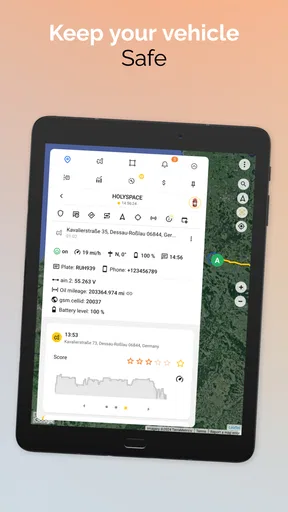
This approach makes the most sense for someone who drives regularly and genuinely wants to review habits over time. A commuter could compare familiar journeys and look for patterns in harsh acceleration or braking; a small-business driver might want a clearer personal record of vehicle use. In either case, I’d review summaries when parked, not while driving, and treat a score as a prompt for reflection rather than a complete measure of road safety.
It is less suitable for someone who wants navigation first, dislikes background location use, or only needs to note occasional mileage. A maps app is usually the better choice when the immediate job is choosing a route, while a basic log can be simpler for recording a few distances. Ruhavik’s appeal is the analysis after the journey, and that value depends on being comfortable with the tracking needed to produce it.
First Impressions
When I first opened Ruhavik, I was greeted by a clean and intuitive interface. I’m not a fan of overly complex apps, and this one hits the sweet spot between functionality and user-friendliness. The dashboard is straightforward, displaying your trip details without overwhelming you with information.
Setting up the app was a breeze. I simply had to sign up, and I was good to go. The GPS tracking kicked in immediately, and I started seeing data on my trips right away. It’s like having a little magic box that records everything about your driving.
Features That Stand Out
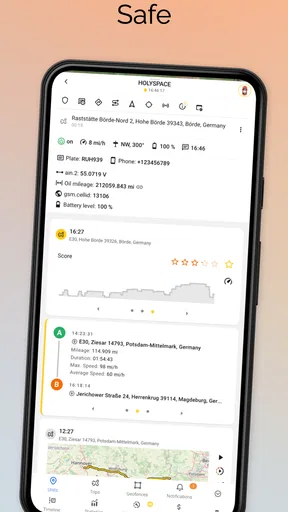
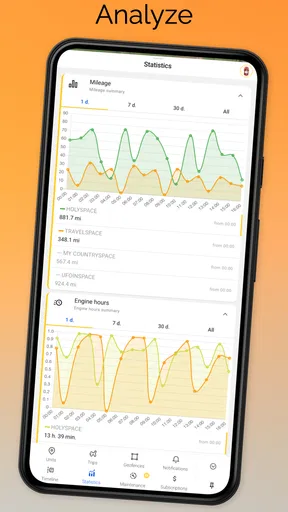
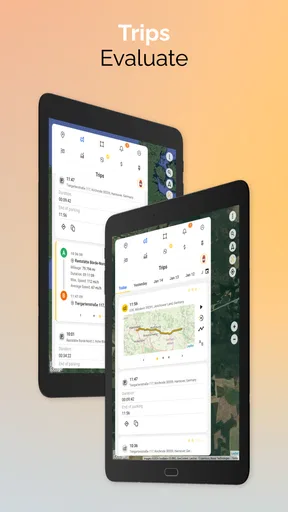
One of the coolest features is the detailed trip analysis. Ever wondered if you’re really that smooth behind the wheel? Well, Ruhavik tells you. It breaks down your trips into segments, showing you where you accelerated too fast or braked too hard. It even gives you a score for each trip, which kind of makes driving feel like a game.
Another handy feature is the fuel consumption analysis. I didn’t realize how much I was spending on fuel until Ruhavik laid it all out for me. It calculates your fuel costs based on your driving habits and routes, which can be quite the eye-opener. Now, I find myself actively trying to improve my score and save a few bucks on gas.
Real-Time Tracking and Safety
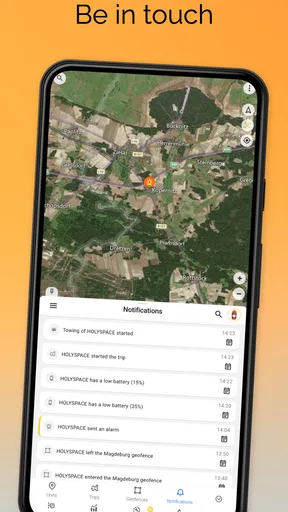
The real-time tracking feature is a lifesaver. If you’re someone who likes to keep tabs on their vehicle, this is perfect. Whether you’re checking in on a family member’s trip or just ensuring your car is where it should be, Ruhavik’s got you covered.
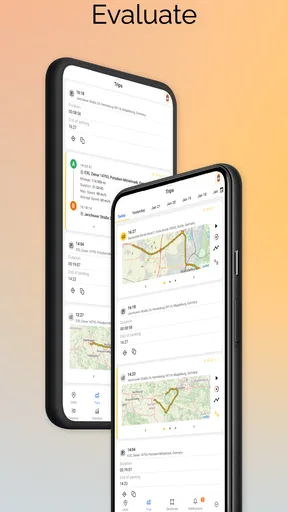
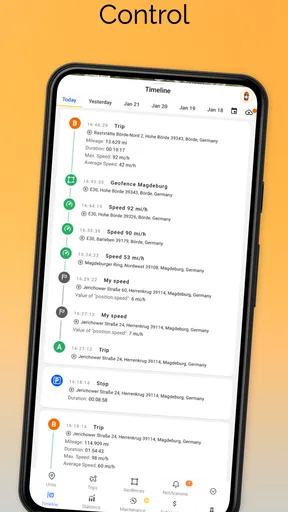
Safety is another big plus. The app alerts you if you’re driving recklessly, which is a nice nudge to keep things under control on the road. Plus, the historical data allows you to review past trips and see where you can improve. It’s like having a backseat driver, but a helpful one!
Room for Improvement
No app is perfect, and Ruhavik is no exception. While the app is generally smooth, I did encounter a few hiccups with GPS accuracy, especially in areas with poor signal. It’s not a deal-breaker, but something to be aware of if you’re often driving in remote locations.
The fuel cost calculation feature could also use more customization options. For instance, adding different types of fuel or factoring in varied fuel prices would make the feature even more robust.
A practical way to test the numbers
For a fair first impression, I would avoid judging the app from one unusual drive. A familiar commute is a better test because I already know where traffic usually slows, where the road curves, and where GPS reception can falter. I’d compare several ordinary trips before drawing conclusions about a score or a change in driving style. A single sharp brake might reflect a real safety issue, but it might also be a sensible response to traffic; context matters.
Fuel estimates need the same kind of care. I’d treat them as a way to notice a direction of change, not as a substitute for fuel receipts or the car’s own records. If the cost result looks surprising, I’d check the assumptions available in the app and compare it with a real fill-up over a reasonable period. That makes the feature more useful without asking it to be more precise than the inputs allow.
Everyday value depends on your routine
Imagine a driver who takes the same route to work most weekdays. They could review the trip after parking, notice that repeated hard braking happens near one busy junction, and choose to leave more following distance or adjust their timing. The useful insight is not simply a higher score; it is connecting a recurring event to a change the driver can safely make. If the alert reflects a sudden hazard, though, I would never encourage someone to prioritize a better score over reacting appropriately.
For a household sharing one car, the app may help the regular driver understand how the vehicle is being used, but shared use also creates a fairness problem: a trip history may not identify the driver in a way that everyone agrees with. I’d discuss tracking openly with anyone who uses the car and avoid presenting the app’s record as proof of who was driving. That is a real limit of turning vehicle movement into a personal account of behavior.
Another useful workflow is to review trips in batches rather than checking every notification or score as it appears. Looking back after a week of normal driving can make repeated patterns easier to spot and reduce the temptation to overreact to one event. It also keeps the app in its proper role: a reflection tool used when the car is parked, not a distraction competing for attention on the road.
Where it fits among driving tools
Compared with a conventional navigation app, Ruhavik is more about what happened during a journey than how to get somewhere next. Maps are better for route choice, live directions, and finding a destination; a mileage notebook or simple tracker is often enough when all I need is a distance record. I’d choose Ruhavik when I want trip-level feedback and a history to review, provided I’m comfortable with location tracking.
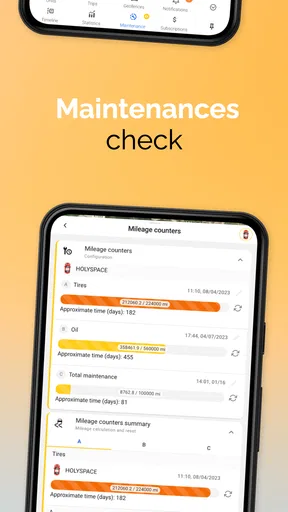
It also shouldn’t replace a vehicle’s maintenance schedule, a professional inspection, or attentive driving. A trip score cannot diagnose a mechanical fault, and tracking cannot guarantee safety. The strongest use is narrower: it can draw attention to driving patterns that might otherwise pass unnoticed, then leave the driver to judge what is relevant and what action is sensible.
Final Thoughts
All in all, Ruhavik — Analyze your trips is a solid app for anyone looking to get a deeper understanding of their driving habits. It’s easy to use, packed with useful features, and provides valuable insights that can help you drive more efficiently and save money.
If you’re curious about your driving performance or just want to ensure your vehicle’s whereabouts, give Ruhavik a try. It’s like having a personal driving assistant that fits right in your smartphone.
My cautious recommendation
I’d recommend giving it a try if you have a clear reason to study your trips and are willing to review location and account choices before building a history. The app is free to start, but the presence of optional in-app purchases means I’d check each purchase carefully rather than assuming every useful feature is included at no cost. Its Everyone age rating describes its store classification; it doesn’t remove the need for adults to think about privacy when a phone records travel.
I would skip it if location tracking itself feels like too much, if you need dependable navigation above all else, or if you only want a bare-bones mileage note. For everyone else, the most sensible test is a short, familiar drive followed by a calm review of the trip, the score, and any settings that affect tracking. If the results help you make a practical change without making you watch your phone on the road, the app is doing its job.
Verdict
Strengths of Ruhavik — Analyze your trips
- User-friendly interface for easy navigation.
- Detailed trip analytics and insights.
- Real-time vehicle tracking feature.
- Customizable notifications for alerts.
- Supports multiple vehicle management.
Limitations of Ruhavik — Analyze your trips
- Limited offline functionality.
- Subscription required for premium features.
- Occasional GPS accuracy issues.
- High battery consumption during use.
- Limited integration with third-party apps.
Similar Picks in This Category
View All
Android Auto
Google LLC4.1

maxim — order a taxi & food
PT. SITO4.7

Штрафы ГИБДД: проверка с фото
Pays LLC – Штрафы ГИБДД4.7

Номерограм – проверка авто
Авто Ассист4.8

Дром Авто
Дром4.9

Frequently Asked Questions
What is Ruhavik and how does it work?
Ruhavik is a mobile application designed to analyze and track your trips. It uses GPS technology to monitor your journeys, providing insights into travel patterns, speed, and distance. Users can view detailed trip reports and optimize their routes for efficiency, making it a useful tool for both personal and professional use.
Is Ruhavik available for both Android and iOS?
Yes, Ruhavik is available for download on both Android and iOS platforms. Users can find the app on Google Play Store for Android devices and on the Apple App Store for iOS devices. Ensure your device meets the app's minimum system requirements for optimal performance.
What features does Ruhavik offer to enhance trip analysis?
Ruhavik offers a variety of features, including real-time GPS tracking, detailed trip reports, speed and distance analysis, and route optimization. Users can also access historical data to review past trips and monitor driving habits, which can be beneficial for improving travel efficiency and safety.
Is there a cost associated with using Ruhavik?
Ruhavik offers both free and premium subscription options. The free version provides basic trip tracking and analysis features, while the premium subscription unlocks additional functionalities, such as advanced reporting and enhanced data storage. Users can choose the plan that best suits their needs and budget.
How does Ruhavik ensure the privacy and security of user data?
Ruhavik prioritizes user privacy and data security by implementing strong encryption protocols and data protection measures. The app does not share your personal data with third parties without consent, and users have control over their data settings. Regular updates ensure that security standards are maintained.
